Skip to content

Budgets

This group of endpoints allows you to retrieve and manage budget data, including listing budgets and fetching individual budget details.

Budgets are organised in a hierarchy where a budget can have multiple members. Each member is associated with a user. Funds can be allocated at the budget level or at the member level, using the flag has_member_limits.
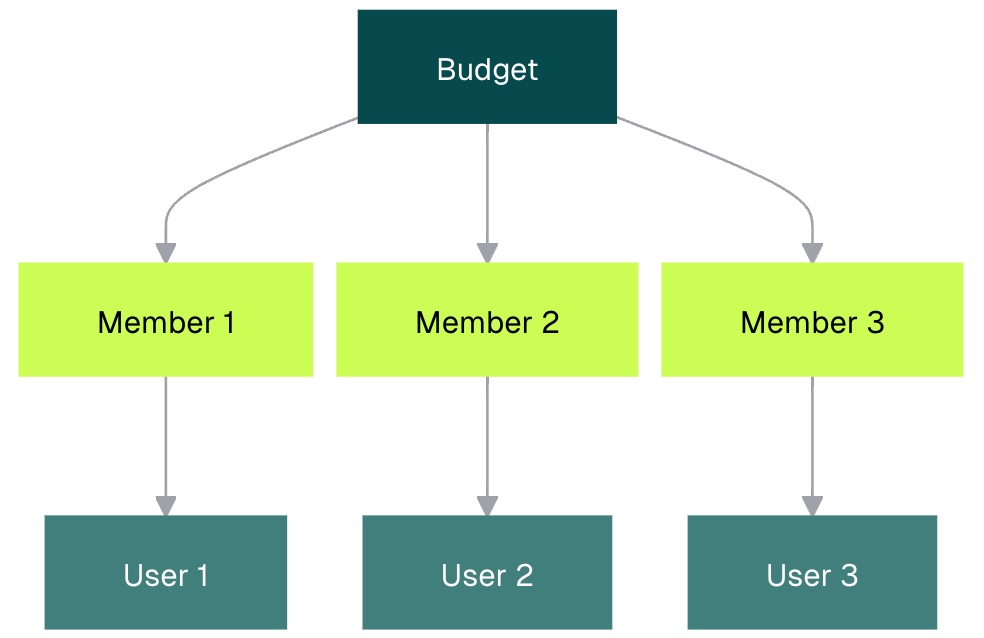
Budget Hierachy

List budgets

Request

Security
BearerAuth
Path
client_idintegerrequired

The ID of the business.

Example:123
Query
offsetinteger

Offset to retrieve items from.

Default:0
Example:offset=50
limitinteger, <= 500

Number of items per page.

Default:50
Example:limit=50
is_deletedboolean

Whether the resource is deleted.

Example:is_deleted=false
budget_typestring

The type of budget.

Enum:"BUDGET""SUBSCRIPTION"
Example:budget_type=BUDGET
has_member_limitsboolean

Whether the budget has member limits.

Example:has_member_limits=false
GET
/v1/businesses/{client_id}/budgets
curl -i -X GET \
  'https://public.letsweel.com/v1/businesses/123/budgets?offset=50&limit=50&is_deleted=false&budget_type=BUDGET&has_member_limits=false' \
  -H 'Authorization: Bearer <YOUR_TOKEN_HERE>'

Responses

OK

Bodyapplication/json
countinteger

The total number of budgets that match the query.

Example:100
nextstring

The URL to the next page of budgets.

Example:"offset=50&limit=50"
previousstring

The URL to the previous page of budgets.

Example:"offset=0&limit=50"
resultsArray of objects(Budget)
Response
{ "count": 100, "next": "offset=50&limit=50", "previous": "offset=0&limit=50", "results": [ {} ] }